2025-04-17 15:47:06 +08:00
# 🦌 DeerFlow
2025-04-07 16:25:55 +08:00
[](https://www.python.org/downloads/)
[](https://opensource.org/licenses/MIT)
2025-05-15 23:56:13 +08:00
[](https://deepwiki.com/bytedance/deer-flow)
2025-05-13 19:53:28 +08:00
2025-05-10 20:13:56 +08:00
<!-- DeepWiki badge generated by https://deepwiki.ryoppippi.com/ -->
2025-04-07 16:25:55 +08:00
2025-05-16 21:43:01 +08:00
[English ](./README.md ) | [简体中文 ](./README_zh.md ) | [日本語 ](./README_ja.md ) | [Deutsch ](./README_de.md ) | [Español ](./README_es.md ) | [Русский ](./README_ru.md ) | [Portuguese ](./README_pt.md )
2025-05-09 13:31:28 +08:00
2025-04-25 15:14:04 +08:00
> Originated from Open Source, give back to Open Source.
2025-04-07 16:25:55 +08:00
2025-04-25 10:34:08 +08:00
**DeerFlow** (**D**eep **E**xploration and **E**fficient **R**esearch **Flow ** ) is a community-driven Deep Research framework that builds upon the incredible work of the open source community. Our goal is to combine language models with specialized tools for tasks like web search, crawling, and Python code execution, while giving back to the community that made this possible.
2025-06-17 08:49:29 +08:00
Currently, DeerFlow has officially entered the [FaaS Application Center of Volcengine ](https://console.volcengine.com/vefaas/region:vefaas+cn-beijing/market ). Users can experience it online through the [experience link ](https://console.volcengine.com/vefaas/region:vefaas+cn-beijing/market/deerflow/?channel=github&source=deerflow ) to intuitively feel its powerful functions and convenient operations. At the same time, to meet the deployment needs of different users, DeerFlow supports one-click deployment based on Volcengine. Click the [deployment link ](https://console.volcengine.com/vefaas/region:vefaas+cn-beijing/application/create?templateId=683adf9e372daa0008aaed5c&channel=github&source=deerflow ) to quickly complete the deployment process and start an efficient research journey.
2025-12-08 17:42:04 +08:00
DeerFlow has newly integrated the intelligent search and crawling toolset independently developed by BytePlus--[InfoQuest (supports free online experience) ](https://docs.byteplus.com/en/docs/InfoQuest/What_is_Info_Quest )
<a href="https://docs.byteplus.com/en/docs/InfoQuest/What_is_Info_Quest" target="_blank">
<img
src="https://sf16-sg.tiktokcdn.com/obj/eden-sg/hubseh7bsbps/20251208-160108.png" alt="infoquest_bannar"
/>
</a>
2025-06-14 13:12:43 +08:00
2025-05-07 20:18:24 +08:00
Please visit [our official website ](https://deerflow.tech/ ) for more details.
2025-05-07 16:45:57 +08:00
2025-05-07 15:08:10 +08:00
## Demo
2025-05-07 16:45:57 +08:00
### Video
2025-05-07 15:08:10 +08:00
2025-07-12 13:59:02 +08:00
<https://github.com/user-attachments/assets/f3786598-1f2a-4d07-919e-8b99dfa1de3e>
2025-05-07 15:08:10 +08:00
In this demo, we showcase how to use DeerFlow to:
2025-05-13 19:53:28 +08:00
2025-05-07 15:08:10 +08:00
- Seamlessly integrate with MCP services
2025-05-07 16:45:57 +08:00
- Conduct the Deep Research process and produce a comprehensive report with images
2025-05-07 15:08:10 +08:00
- Create podcast audio based on the generated report
2025-05-07 16:45:57 +08:00
### Replays
- [How tall is Eiffel Tower compared to tallest building? ](https://deerflow.tech/chat?replay=eiffel-tower-vs-tallest-building )
- [What are the top trending repositories on GitHub? ](https://deerflow.tech/chat?replay=github-top-trending-repo )
- [Write an article about Nanjing's traditional dishes ](https://deerflow.tech/chat?replay=nanjing-traditional-dishes )
- [How to decorate a rental apartment? ](https://deerflow.tech/chat?replay=rental-apartment-decoration )
2025-05-08 08:59:31 +08:00
- [Visit our official website to explore more replays. ](https://deerflow.tech/#case-studies )
2025-05-07 15:08:10 +08:00
---
2025-04-25 10:34:08 +08:00
## 📑 Table of Contents
2025-05-07 15:08:10 +08:00
2025-04-25 10:34:08 +08:00
- [🚀 Quick Start ](#quick-start )
2025-05-07 20:18:24 +08:00
- [🌟 Features ](#features )
2025-04-25 10:34:08 +08:00
- [🏗️ Architecture ](#architecture )
2025-05-07 20:18:24 +08:00
- [🛠️ Development ](#development )
2025-05-13 19:53:28 +08:00
- [🐳 Docker ](#docker )
2025-04-25 10:34:08 +08:00
- [🗣️ Text-to-Speech Integration ](#text-to-speech-integration )
- [📚 Examples ](#examples )
2025-05-07 20:18:24 +08:00
- [❓ FAQ ](#faq )
- [📜 License ](#license )
2025-04-25 10:34:08 +08:00
- [💖 Acknowledgments ](#acknowledgments )
2025-05-09 11:34:19 +08:00
- [⭐ Star History ](#star-history )
2025-04-25 10:34:08 +08:00
2025-04-07 16:25:55 +08:00
## Quick Start
2025-04-25 10:34:08 +08:00
DeerFlow is developed in Python, and comes with a web UI written in Node.js. To ensure a smooth setup process, we recommend using the following tools:
### Recommended Tools
2025-05-13 19:53:28 +08:00
2025-04-25 10:34:08 +08:00
- **[`uv` ](https://docs.astral.sh/uv/getting-started/installation/ ):**
Simplify Python environment and dependency management. `uv` automatically creates a virtual environment in the root directory and installs all required packages for you—no need to manually install Python environments.
- **[`nvm` ](https://github.com/nvm-sh/nvm ):**
Manage multiple versions of the Node.js runtime effortlessly.
- **[`pnpm` ](https://pnpm.io/installation ):**
Install and manage dependencies of Node.js project.
### Environment Requirements
2025-05-13 19:53:28 +08:00
2025-04-25 10:34:08 +08:00
Make sure your system meets the following minimum requirements:
2025-05-13 19:53:28 +08:00
2025-04-25 10:34:08 +08:00
- **[Python ](https://www.python.org/downloads/ ):** Version `3.12+`
- **[Node.js ](https://nodejs.org/en/download/ ):** Version `22+`
### Installation
2025-05-13 19:53:28 +08:00
2025-04-07 16:25:55 +08:00
```bash
# Clone the repository
2025-04-17 15:47:06 +08:00
git clone https://github.com/bytedance/deer-flow.git
cd deer-flow
2025-04-07 16:25:55 +08:00
2025-04-11 15:37:55 +08:00
# Install dependencies, uv will take care of the python interpreter and venv creation, and install the required packages
2025-04-07 16:25:55 +08:00
uv sync
2025-04-18 15:28:31 +08:00
# Configure .env with your API keys
2025-04-11 11:40:26 +08:00
# Tavily: https://app.tavily.com/home
2025-04-11 15:37:55 +08:00
# Brave_SEARCH: https://brave.com/search/api/
2025-04-18 15:28:31 +08:00
# volcengine TTS: Add your TTS credentials if you have them
2025-04-07 16:25:55 +08:00
cp .env.example .env
2025-04-18 15:28:31 +08:00
# See the 'Supported Search Engines' and 'Text-to-Speech Integration' sections below for all available options
2025-04-11 15:37:55 +08:00
2025-04-11 11:40:26 +08:00
# Configure conf.yaml for your LLM model and API keys
2025-05-08 09:36:22 +08:00
# Please refer to 'docs/configuration_guide.md' for more details
2025-09-27 17:48:39 -07:00
# For local development, you can use Ollama or other local models
2025-04-11 11:40:26 +08:00
cp conf.yaml.example conf.yaml
2025-04-07 16:25:55 +08:00
2025-04-21 16:43:06 +08:00
# Install marp for ppt generation
# https://github.com/marp-team/marp-cli?tab=readme-ov-file#use-package-manager
brew install marp-cli
2025-04-25 10:34:08 +08:00
```
Optionally, install web UI dependencies via [pnpm ](https://pnpm.io/installation ):
```bash
2025-05-08 10:02:19 +08:00
cd deer-flow/web
2025-04-25 10:34:08 +08:00
pnpm install
```
2025-05-07 20:18:24 +08:00
### Configurations
Please refer to the [Configuration Guide ](docs/configuration_guide.md ) for more details.
> [!NOTE]
> Before you start the project, read the guide carefully, and update the configurations to match your specific settings and requirements.
2025-04-25 10:34:08 +08:00
### Console UI
The quickest way to run the project is to use the console UI.
2025-04-21 16:43:06 +08:00
2025-04-25 10:34:08 +08:00
```bash
# Run the project in a bash-like shell
2025-04-07 16:25:55 +08:00
uv run main.py
```
2025-04-25 10:34:08 +08:00
### Web UI
This project also includes a Web UI, offering a more dynamic and engaging interactive experience.
2025-05-13 19:53:28 +08:00
2025-04-25 15:39:52 +08:00
> [!NOTE]
> You need to install the dependencies of web UI first.
2025-04-25 10:34:08 +08:00
```bash
2025-04-25 15:59:07 +08:00
# Run both the backend and frontend servers in development mode
2025-05-01 12:43:27 +08:00
# On macOS/Linux
2025-04-25 15:59:07 +08:00
./bootstrap.sh -d
2025-05-01 12:43:27 +08:00
# On Windows
2025-05-07 16:45:57 +08:00
bootstrap.bat -d
2025-04-25 10:34:08 +08:00
```
2025-09-09 23:05:04 +08:00
> [!Note]
> By default, the backend server binds to 127.0.0.1 (localhost) for security reasons. If you need to allow external connections (e.g., when deploying on Linux server), you can modify the server host to 0.0.0.0 in the bootstrap script(uv run server.py --host 0.0.0.0).
> Please ensure your environment is properly secured before exposing the service to external networks.
2025-04-16 20:18:21 +08:00
2025-04-25 10:34:08 +08:00
Open your browser and visit [`http://localhost:3000` ](http://localhost:3000 ) to explore the web UI.
2025-04-16 20:18:21 +08:00
2025-05-08 08:59:31 +08:00
Explore more details in the [`web` ](./web/ ) directory.
2025-04-16 20:18:21 +08:00
2025-04-11 15:37:55 +08:00
## Supported Search Engines
2025-07-07 13:05:01 +08:00
### Web Search
2025-05-08 08:59:31 +08:00
DeerFlow supports multiple search engines that can be configured in your `.env` file using the `SEARCH_API` variable:
2025-04-11 15:37:55 +08:00
- **Tavily** (default): A specialized search API for AI applications
2025-05-13 19:53:28 +08:00
- Requires `TAVILY_API_KEY` in your `.env` file
- Sign up at: https://app.tavily.com/home
2025-04-11 15:37:55 +08:00
2025-12-02 08:16:35 +08:00
- **InfoQuest** (recommended): AI-optimized intelligent search and crawling toolset independently developed by BytePlus
- Requires `INFOQUEST_API_KEY` in your `.env` file
- Support for time range filtering and site filtering
- Provides high-quality search results and content extraction
- Sign up at: https://console.byteplus.com/infoquest/infoquests
- Visit https://docs.byteplus.com/en/docs/InfoQuest/What_is_Info_Quest to learn more
2025-04-11 15:37:55 +08:00
- **DuckDuckGo**: Privacy-focused search engine
2025-05-13 19:53:28 +08:00
- No API key required
2025-04-11 15:37:55 +08:00
- **Brave Search**: Privacy-focused search engine with advanced features
2025-05-13 19:53:28 +08:00
- Requires `BRAVE_SEARCH_API_KEY` in your `.env` file
- Sign up at: https://brave.com/search/api/
2025-04-11 15:37:55 +08:00
- **Arxiv**: Scientific paper search for academic research
2025-05-13 19:53:28 +08:00
- No API key required
- Specialized for scientific and academic papers
2025-04-11 15:37:55 +08:00
2025-09-22 18:54:30 +08:00
- **Searx/SearxNG**: Self-hosted metasearch engine
- Requires `SEARX_HOST` to be set in the `.env` file
- Supports connecting to either Searx or SearxNG
2025-04-11 15:37:55 +08:00
To configure your preferred search engine, set the `SEARCH_API` variable in your `.env` file:
```bash
2025-12-02 08:16:35 +08:00
# Choose one: tavily, infoquest, duckduckgo, brave_search, arxiv
2025-04-11 15:37:55 +08:00
SEARCH_API=tavily
```
2025-12-02 08:16:35 +08:00
### Crawling Tools
DeerFlow supports multiple crawling tools that can be configured in your `conf.yaml` file:
- **Jina** (default): Freely accessible web content crawling tool
- **InfoQuest** (recommended): AI-optimized intelligent search and crawling toolset developed by BytePlus
- Requires `INFOQUEST_API_KEY` in your `.env` file
- Provides configurable crawling parameters
- Supports custom timeout settings
- Offers more powerful content extraction capabilities
- Visit https://docs.byteplus.com/en/docs/InfoQuest/What_is_Info_Quest to learn more
To configure your preferred crawling tool, set the following in your `conf.yaml` file:
```yaml
CRAWLER_ENGINE:
# Engine type: "jina" (default) or "infoquest"
engine: infoquest
```
2025-07-07 13:05:01 +08:00
### Private Knowledgebase
2025-11-11 17:05:00 +05:30
DeerFlow supports private knowledgebase such as RAGFlow, Qdrant, Milvus, and VikingDB, so that you can use your private documents to answer questions.
2025-07-07 13:05:01 +08:00
2025-11-11 17:05:00 +05:30
- **[RAGFlow ](https://ragflow.io/docs/dev/ )**: open source RAG engine
```bash
2025-07-07 13:05:01 +08:00
# examples in .env.example
RAG_PROVIDER=ragflow
RAGFLOW_API_URL="http://localhost:9388"
RAGFLOW_API_KEY="ragflow-xxx"
RAGFLOW_RETRIEVAL_SIZE=10
2025-07-24 16:39:02 +08:00
RAGFLOW_CROSS_LANGUAGES=English,Chinese,Spanish,French,German,Japanese,Korean
2025-07-07 13:05:01 +08:00
```
2025-11-11 17:05:00 +05:30
- **[Qdrant ](https://qdrant.tech/ )**: open source vector database
```bash
# Using Qdrant Cloud or self-hosted
RAG_PROVIDER=qdrant
QDRANT_LOCATION=https://xyz-example.eu-central.aws.cloud.qdrant.io:6333
QDRANT_API_KEY=your_qdrant_api_key
QDRANT_COLLECTION=documents
QDRANT_EMBEDDING_PROVIDER=openai
QDRANT_EMBEDDING_MODEL=text-embedding-ada-002
QDRANT_EMBEDDING_API_KEY=your_openai_api_key
QDRANT_AUTO_LOAD_EXAMPLES=true
```
2025-05-07 20:18:24 +08:00
## Features
### Core Capabilities
- 🤖 **LLM Integration **
2025-05-13 19:53:28 +08:00
- It supports the integration of most models through [litellm ](https://docs.litellm.ai/docs/providers ).
2025-08-13 22:29:22 +08:00
- Support for open source models like Qwen, you need to read the [configuration ](docs/configuration_guide.md ) for more details.
2025-05-13 19:53:28 +08:00
- OpenAI-compatible API interface
- Multi-tier LLM system for different task complexities
2025-05-07 20:18:24 +08:00
### Tools and MCP Integrations
- 🔍 **Search and Retrieval **
2025-12-02 08:16:35 +08:00
- Web search via Tavily, InfoQuest, Brave Search and more
- Crawling with Jina and InfoQuest
2025-05-13 19:53:28 +08:00
- Advanced content extraction
2025-07-07 13:05:01 +08:00
- Support for private knowledgebase
2025-05-07 20:18:24 +08:00
2025-05-28 14:13:46 +08:00
- 📃 **RAG Integration **
2025-11-11 17:05:00 +05:30
- Supports multiple vector databases: [Qdrant ](https://qdrant.tech/ ), [Milvus ](https://milvus.io/ ), [RAGFlow ](https://github.com/infiniflow/ragflow ), VikingDB, MOI, and Dify
- Supports mentioning files from RAG providers within the input box
- Easy switching between different vector databases through configuration
2025-05-28 14:13:46 +08:00
2025-05-07 20:18:24 +08:00
- 🔗 **MCP Seamless Integration **
2025-05-13 19:53:28 +08:00
- Expand capabilities for private domain access, knowledge graph, web browsing and more
- Facilitates integration of diverse research tools and methodologies
2025-05-07 20:18:24 +08:00
### Human Collaboration
2025-10-13 22:35:57 -07:00
- 💬 **Intelligent Clarification Feature **
- Multi-turn dialogue to clarify vague research topics
- Improve research precision and report quality
- Reduce ineffective searches and token usage
- Configurable switch for flexible enable/disable control
- See [Configuration Guide - Clarification ](./docs/configuration_guide.md#multi-turn-clarification-feature ) for details
2025-05-07 20:18:24 +08:00
- 🧠 **Human-in-the-loop **
2025-05-13 19:53:28 +08:00
- Supports interactive modification of research plans using natural language
- Supports auto-acceptance of research plans
2025-05-07 20:18:24 +08:00
- 📝 **Report Post-Editing **
2025-05-13 19:53:28 +08:00
- Supports Notion-like block editing
- Allows AI refinements, including AI-assisted polishing, sentence shortening, and expansion
- Powered by [tiptap ](https://tiptap.dev/ )
2025-05-07 20:18:24 +08:00
### Content Creation
- 🎙️ **Podcast and Presentation Generation **
2025-05-13 19:53:28 +08:00
- AI-powered podcast script generation and audio synthesis
- Automated creation of simple PowerPoint presentations
- Customizable templates for tailored content
2025-05-07 20:18:24 +08:00
## Architecture
DeerFlow implements a modular multi-agent system architecture designed for automated research and code analysis. The system is built on LangGraph, enabling a flexible state-based workflow where components communicate through a well-defined message passing system.

2025-05-13 19:53:28 +08:00
2025-05-08 08:59:31 +08:00
> See it live at [deerflow.tech](https://deerflow.tech/#multi-agent-architecture)
2025-05-07 20:18:24 +08:00
The system employs a streamlined workflow with the following components:
1. **Coordinator ** : The entry point that manages the workflow lifecycle
2025-05-13 19:53:28 +08:00
2025-05-07 20:18:24 +08:00
- Initiates the research process based on user input
- Delegates tasks to the planner when appropriate
- Acts as the primary interface between the user and the system
2. **Planner ** : Strategic component for task decomposition and planning
2025-05-13 19:53:28 +08:00
2025-05-07 20:18:24 +08:00
- Analyzes research objectives and creates structured execution plans
- Determines if enough context is available or if more research is needed
- Manages the research flow and decides when to generate the final report
3. **Research Team ** : A collection of specialized agents that execute the plan:
- **Researcher**: Conducts web searches and information gathering using tools like web search engines, crawling and even MCP services.
- **Coder**: Handles code analysis, execution, and technical tasks using Python REPL tool.
2025-05-13 19:53:28 +08:00
Each agent has access to specific tools optimized for their role and operates within the LangGraph framework
2025-05-07 20:18:24 +08:00
4. **Reporter ** : Final stage processor for research outputs
- Aggregates findings from the research team
- Processes and structures the collected information
- Generates comprehensive research reports
## Text-to-Speech Integration
DeerFlow now includes a Text-to-Speech (TTS) feature that allows you to convert research reports to speech. This feature uses the volcengine TTS API to generate high-quality audio from text. Features like speed, volume, and pitch are also customizable.
### Using the TTS API
You can access the TTS functionality through the `/api/tts` endpoint:
```bash
# Example API call using curl
curl --location 'http://localhost:8000/api/tts' \
--header 'Content-Type: application/json' \
--data '{
"text": "This is a test of the text-to-speech functionality.",
"speed_ratio": 1.0,
"volume_ratio": 1.0,
"pitch_ratio": 1.0
}' \
--output speech.mp3
```
2025-04-07 16:25:55 +08:00
## Development
### Testing
2025-11-28 22:09:13 +08:00
Install development dependencies:
```bash
uv pip install -e ".[test]"
```
2025-04-07 16:25:55 +08:00
Run the test suite:
```bash
# Run all tests
make test
# Run specific test file
pytest tests/integration/test_workflow.py
# Run with coverage
make coverage
```
### Code Quality
```bash
# Run linting
make lint
# Format code
make format
```
2025-04-22 15:33:53 +08:00
### Debugging with LangGraph Studio
DeerFlow uses LangGraph for its workflow architecture. You can use LangGraph Studio to debug and visualize the workflow in real-time.
#### Running LangGraph Studio Locally
DeerFlow includes a `langgraph.json` configuration file that defines the graph structure and dependencies for the LangGraph Studio. This file points to the workflow graphs defined in the project and automatically loads environment variables from the `.env` file.
##### Mac
```bash
# Install uv package manager if you don't have it
curl -LsSf https://astral.sh/uv/install.sh | sh
# Install dependencies and start the LangGraph server
2025-04-23 16:19:50 +08:00
uvx --refresh --from "langgraph-cli[inmem]" --with-editable . --python 3.12 langgraph dev --allow-blocking
2025-04-22 15:33:53 +08:00
```
##### Windows / Linux
```bash
# Install dependencies
pip install -e .
pip install -U "langgraph-cli[inmem]"
# Start the LangGraph server
langgraph dev
```
After starting the LangGraph server, you'll see several URLs in the terminal:
2025-05-13 19:53:28 +08:00
2025-04-22 15:33:53 +08:00
- API: http://127.0.0.1:2024
- Studio UI: https://smith.langchain.com/studio/?baseUrl=http://127.0.0.1:2024
- API Docs: http://127.0.0.1:2024/docs
Open the Studio UI link in your browser to access the debugging interface.
#### Using LangGraph Studio
In the Studio UI, you can:
1. Visualize the workflow graph and see how components connect
2. Trace execution in real-time to see how data flows through the system
3. Inspect the state at each step of the workflow
4. Debug issues by examining inputs and outputs of each component
5. Provide feedback during the planning phase to refine research plans
When you submit a research topic in the Studio UI, you'll be able to see the entire workflow execution, including:
2025-05-13 19:53:28 +08:00
2025-04-22 15:33:53 +08:00
- The planning phase where the research plan is created
- The feedback loop where you can modify the plan
- The research and writing phases for each section
- The final report generation
2025-05-14 10:12:50 +08:00
### Enabling LangSmith Tracing
DeerFlow supports LangSmith tracing to help you debug and monitor your workflows. To enable LangSmith tracing:
1. Make sure your `.env` file has the following configurations (see `.env.example` ):
2025-05-28 14:13:46 +08:00
2025-05-14 10:12:50 +08:00
```bash
LANGSMITH_TRACING=true
LANGSMITH_ENDPOINT="https://api.smith.langchain.com"
LANGSMITH_API_KEY="xxx"
LANGSMITH_PROJECT="xxx"
```
2. Start tracing and visualize the graph locally with LangSmith by running:
```bash
langgraph dev
```
This will enable trace visualization in LangGraph Studio and send your traces to LangSmith for monitoring and analysis.
2025-08-16 21:03:12 +08:00
### Checkpointing
1. Postgres and MonogDB implementation of LangGraph checkpoint saver.
2. In-memory store is used to caching the streaming messages before persisting to database, If finish_reason is "stop" or "interrupt", it triggers persistence.
3. Supports saving and loading checkpoints for workflow execution.
4. Supports saving chat stream events for replaying conversations.
2025-09-09 17:28:18 +08:00
*Note: About langgraph issue #5557 *
2025-08-16 21:03:12 +08:00
The latest langgraph-checkpoint-postgres-2.0.23 have checkpointing issue, you can check the open issue:"TypeError: Object of type HumanMessage is not JSON serializable" [https://github.com/langchain-ai/langgraph/issues/5557].
To use postgres checkpoint you should install langgraph-checkpoint-postgres-2.0.21
2025-09-09 17:28:18 +08:00
*Note: About psycopg dependencies*
Please read the following document before using postgres: https://www.psycopg.org/psycopg3/docs/basic/install.html
BY default, psycopg needs libpq to be installed on your system. If you don't have libpq installed, you can install psycopg with the `binary` extra to include a statically linked version of libpq mannually:
```bash
pip install psycopg[binary]
```
This will install a self-contained package with all the libraries needed, but binary not supported for all platform, you check the supported platform : https://pypi.org/project/psycopg-binary/#files
if not supported, you can select local-installation: https://www.psycopg.org/psycopg3/docs/basic/install.html#local -installation
2025-08-16 21:03:12 +08:00
The default database and collection will be automatically created if not exists.
Default database: checkpoing_db
Default collection: checkpoint_writes_aio (langgraph checkpoint writes)
Default collection: checkpoints_aio (langgraph checkpoints)
Default collection: chat_streams (chat stream events for replaying conversations)
You need to set the following environment variables in your `.env` file:
```bash
# Enable LangGraph checkpoint saver, supports MongoDB, Postgres
LANGGRAPH_CHECKPOINT_SAVER=true
# Set the database URL for saving checkpoints
LANGGRAPH_CHECKPOINT_DB_URL="mongodb://localhost:27017/"
#LANGGRAPH_CHECKPOINT_DB_URL=postgresql://localhost:5432/postgres
```
2025-05-13 19:53:28 +08:00
## Docker
You can also run this project with Docker.
2025-05-15 03:54:33 +03:00
First, you need read the [configuration ](docs/configuration_guide.md ) below. Make sure `.env` , `.conf.yaml` files are ready.
2025-05-13 19:53:28 +08:00
Second, to build a Docker image of your own web server:
```bash
docker build -t deer-flow-api .
```
Final, start up a docker container running the web server:
```bash
# Replace deer-flow-api-app with your preferred container name
2025-08-11 19:28:21 +08:00
# Start the server then bind to localhost:8000
docker run -d -t -p 127.0.0.1:8000:8000 --env-file .env --name deer-flow-api-app deer-flow-api
2025-05-13 19:53:28 +08:00
# stop the server
docker stop deer-flow-api-app
```
### Docker Compose (include both backend and frontend)
DeerFlow provides a docker-compose setup to easily run both the backend and frontend together:
```bash
# building docker image
docker compose build
# start the server
docker compose up
```
2025-08-06 14:27:03 +08:00
> [!WARNING]
> If you want to deploy the deer flow into production environments, please add authentication to the website and evaluate your security check of the MCPServer and Python Repl.
2025-04-07 16:25:55 +08:00
## Examples
2025-04-17 15:47:06 +08:00
The following examples demonstrate the capabilities of DeerFlow:
2025-04-07 16:25:55 +08:00
### Research Reports
2025-04-10 11:50:28 +08:00
1. **OpenAI Sora Report ** - Analysis of OpenAI's Sora AI tool
2025-05-13 19:53:28 +08:00
2025-04-10 11:50:28 +08:00
- Discusses features, access, prompt engineering, limitations, and ethical considerations
- [View full report ](examples/openai_sora_report.md )
2. **Google's Agent to Agent Protocol Report ** - Overview of Google's Agent to Agent (A2A) protocol
2025-05-13 19:53:28 +08:00
2025-04-10 11:50:28 +08:00
- Discusses its role in AI agent communication and its relationship with Anthropic's Model Context Protocol (MCP)
- [View full report ](examples/what_is_agent_to_agent_protocol.md )
3. **What is MCP? ** - A comprehensive analysis of the term "MCP" across multiple contexts
2025-05-13 19:53:28 +08:00
2025-04-07 16:25:55 +08:00
- Explores Model Context Protocol in AI, Monocalcium Phosphate in chemistry, and Micro-channel Plate in electronics
- [View full report ](examples/what_is_mcp.md )
2025-04-10 11:50:28 +08:00
4. **Bitcoin Price Fluctuations ** - Analysis of recent Bitcoin price movements
2025-05-13 19:53:28 +08:00
2025-04-07 16:25:55 +08:00
- Examines market trends, regulatory influences, and technical indicators
- Provides recommendations based on historical data
- [View full report ](examples/bitcoin_price_fluctuation.md )
2025-04-10 11:50:28 +08:00
5. **What is LLM? ** - An in-depth exploration of Large Language Models
2025-05-13 19:53:28 +08:00
2025-04-07 16:25:55 +08:00
- Discusses architecture, training, applications, and ethical considerations
- [View full report ](examples/what_is_llm.md )
2025-04-10 11:50:28 +08:00
6. **How to Use Claude for Deep Research? ** - Best practices and workflows for using Claude in deep research
2025-05-13 19:53:28 +08:00
2025-04-10 11:50:28 +08:00
- Covers prompt engineering, data analysis, and integration with other tools
- [View full report ](examples/how_to_use_claude_deep_research.md )
2025-04-11 11:40:26 +08:00
7. **AI Adoption in Healthcare: Influencing Factors ** - Analysis of factors driving AI adoption in healthcare
2025-05-13 19:53:28 +08:00
2025-04-11 11:40:26 +08:00
- Discusses AI technologies, data quality, ethical considerations, economic evaluations, organizational readiness, and digital infrastructure
- [View full report ](examples/AI_adoption_in_healthcare.md )
2025-04-12 12:01:30 +08:00
8. **Quantum Computing Impact on Cryptography ** - Analysis of quantum computing's impact on cryptography
2025-05-13 19:53:28 +08:00
2025-04-12 12:01:30 +08:00
- Discusses vulnerabilities of classical cryptography, post-quantum cryptography, and quantum-resistant cryptographic solutions
- [View full report ](examples/Quantum_Computing_Impact_on_Cryptography.md )
2025-04-14 18:01:50 +08:00
9. **Cristiano Ronaldo's Performance Highlights ** - Analysis of Cristiano Ronaldo's performance highlights
- Discusses his career achievements, international goals, and performance in various matches
- [View full report ](examples/Cristiano_Ronaldo's_Performance_Highlights.md )
2025-04-07 16:25:55 +08:00
To run these examples or create your own research reports, you can use the following commands:
```bash
# Run with a specific query
uv run main.py "What factors are influencing AI adoption in healthcare?"
# Run with custom planning parameters
uv run main.py --max_plan_iterations 3 "How does quantum computing impact cryptography?"
2025-04-11 11:40:26 +08:00
# Run in interactive mode with built-in questions
uv run main.py --interactive
# Or run with basic interactive prompt
2025-04-07 16:25:55 +08:00
uv run main.py
# View all available options
uv run main.py --help
```
2025-04-11 11:40:26 +08:00
### Interactive Mode
The application now supports an interactive mode with built-in questions in both English and Chinese:
1. Launch the interactive mode:
2025-05-13 19:53:28 +08:00
2025-04-11 11:40:26 +08:00
```bash
uv run main.py --interactive
```
2. Select your preferred language (English or 中文)
3. Choose from a list of built-in questions or select the option to ask your own question
4. The system will process your question and generate a comprehensive research report
2025-04-14 18:01:50 +08:00
### Human in the Loop
2025-04-17 15:47:06 +08:00
DeerFlow includes a human in the loop mechanism that allows you to review, edit, and approve research plans before they are executed:
2025-04-14 18:01:50 +08:00
1. **Plan Review ** : When human in the loop is enabled, the system will present the generated research plan for your review before execution
2. **Providing Feedback ** : You can:
2025-05-13 19:53:28 +08:00
2025-04-14 18:01:50 +08:00
- Accept the plan by responding with `[ACCEPTED]`
- Edit the plan by providing feedback (e.g., `[EDIT PLAN] Add more steps about technical implementation` )
- The system will incorporate your feedback and generate a revised plan
3. **Auto-acceptance ** : You can enable auto-acceptance to skip the review process:
2025-05-13 19:53:28 +08:00
2025-04-14 18:01:50 +08:00
- Via API: Set `auto_accepted_plan: true` in your request
4. **API Integration ** : When using the API, you can provide feedback through the `feedback` parameter:
2025-07-12 13:59:02 +08:00
2025-04-14 18:01:50 +08:00
```json
{
2025-05-13 19:53:28 +08:00
"messages": [{ "role": "user", "content": "What is quantum computing?" }],
2025-04-14 18:01:50 +08:00
"thread_id": "my_thread_id",
"auto_accepted_plan": false,
"feedback": "[EDIT PLAN] Include more about quantum algorithms"
}
```
2025-04-07 16:25:55 +08:00
### Command Line Arguments
The application supports several command-line arguments to customize its behavior:
- **query**: The research query to process (can be multiple words)
2025-04-11 11:40:26 +08:00
- **--interactive**: Run in interactive mode with built-in questions
2025-04-07 16:25:55 +08:00
- **--max_plan_iterations**: Maximum number of planning cycles (default: 1)
- **--max_step_num**: Maximum number of steps in a research plan (default: 3)
- **--debug**: Enable detailed debug logging
2025-05-07 20:18:24 +08:00
## FAQ
Please refer to the [FAQ.md ](docs/FAQ.md ) for more details.
2025-04-07 16:25:55 +08:00
## License
2025-05-07 20:18:24 +08:00
This project is open source and available under the [MIT License ](./LICENSE ).
2025-04-07 16:25:55 +08:00
## Acknowledgments
2025-04-25 10:34:08 +08:00
DeerFlow is built upon the incredible work of the open-source community. We are deeply grateful to all the projects and contributors whose efforts have made DeerFlow possible. Truly, we stand on the shoulders of giants.
We would like to extend our sincere appreciation to the following projects for their invaluable contributions:
- **[LangChain ](https://github.com/langchain-ai/langchain )**: Their exceptional framework powers our LLM interactions and chains, enabling seamless integration and functionality.
- **[LangGraph ](https://github.com/langchain-ai/langgraph )**: Their innovative approach to multi-agent orchestration has been instrumental in enabling DeerFlow's sophisticated workflows.
2025-05-28 14:13:46 +08:00
- **[Novel ](https://github.com/steven-tey/novel )**: Their Notion-style WYSIWYG editor supports our report editing and AI-assisted rewriting.
- **[RAGFlow ](https://github.com/infiniflow/ragflow )**: We have achieved support for research on users' private knowledge bases through integration with RAGFlow.
2025-04-25 10:34:08 +08:00
These projects exemplify the transformative power of open-source collaboration, and we are proud to build upon their foundations.
### Key Contributors
2025-05-13 19:53:28 +08:00
2025-04-25 10:34:08 +08:00
A heartfelt thank you goes out to the core authors of `DeerFlow` , whose vision, passion, and dedication have brought this project to life:
2025-04-07 16:25:55 +08:00
2025-04-25 10:34:08 +08:00
- **[Daniel Walnut ](https://github.com/hetaoBackend/ )**
- **[Henry Li ](https://github.com/magiccube/ )**
2025-04-07 16:25:55 +08:00
2025-04-25 10:34:08 +08:00
Your unwavering commitment and expertise have been the driving force behind DeerFlow's success. We are honored to have you at the helm of this journey.
2025-05-09 11:34:19 +08:00
2025-05-09 13:31:28 +08:00
## Star History
2025-05-09 11:34:19 +08:00
2025-12-02 08:16:35 +08:00
[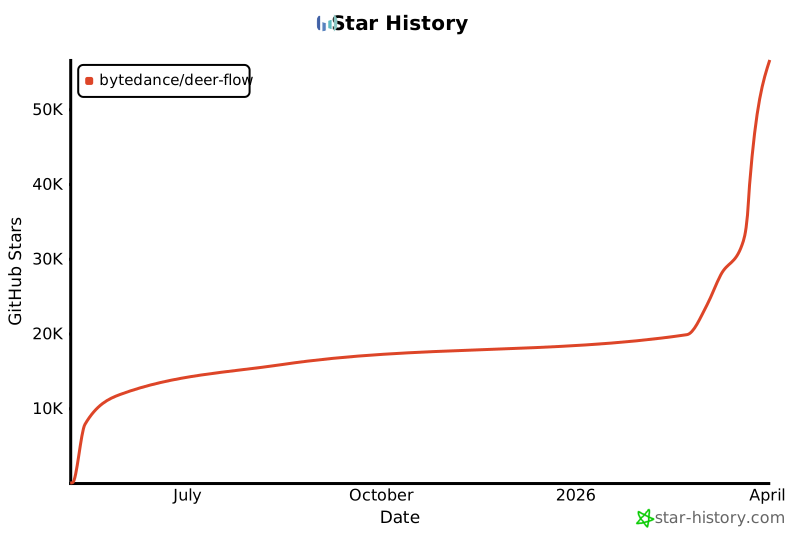](https://star-history.com/#bytedance/deer -flow&Date)
